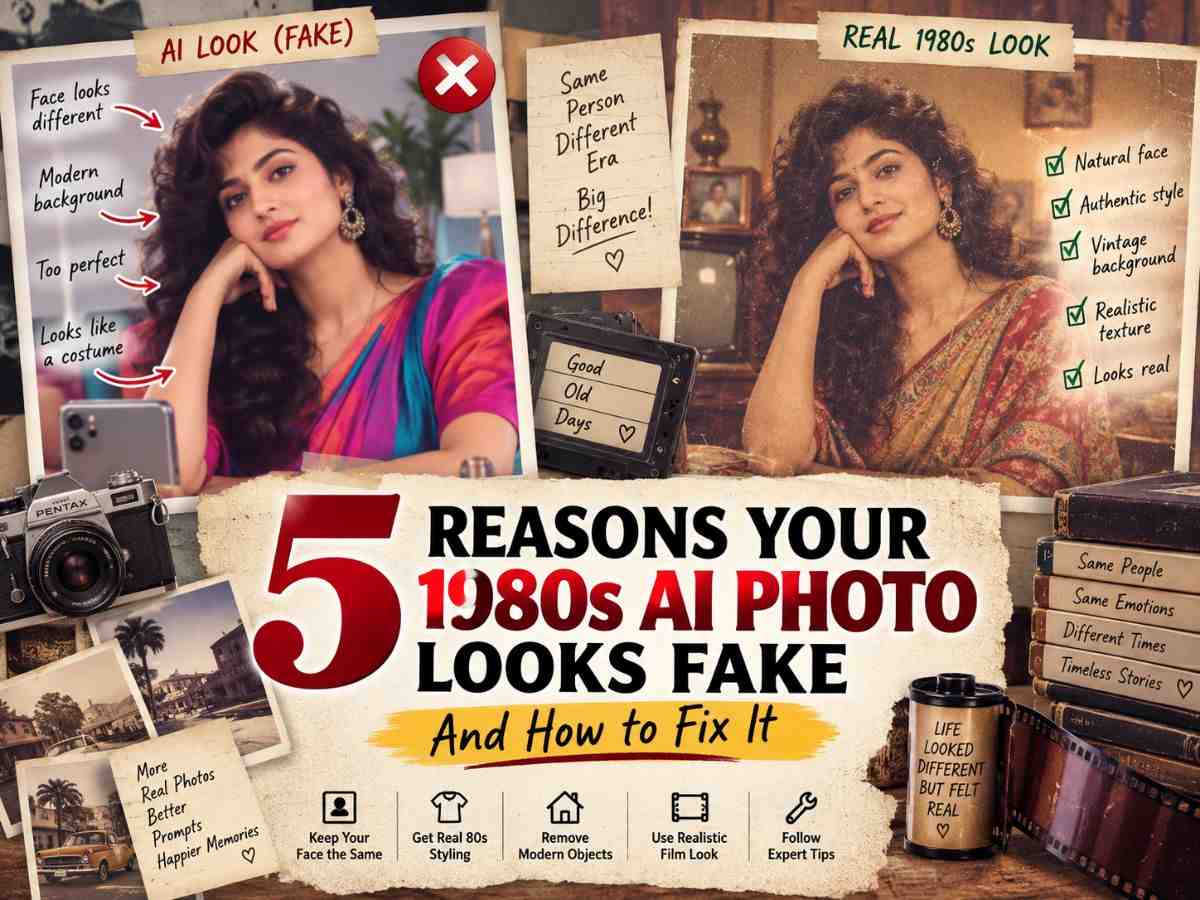
The 1980s AI photo trend has made it easy to turn an ordinary modern picture into a retro-looking portrait. With the right image prompt, a selfie can be transformed into an old family photograph, a Bollywood-style portrait, a vintage wedding picture or even a college photo that looks as though it came from another decade.
But there is a common problem: the final image often looks more like an AI-generated costume than a real photograph from the 1980s.
The face may look different, the hairstyle may be exaggerated, the clothes may appear theatrical, and the background can contain objects that clearly belong to the present day. Sometimes the image is technically impressive but simply looks too clean and polished to feel like an old photograph.
So why does this happen?
Usually, the problem is not the idea of the prompt itself. The bigger issue is how much control the prompt gives the image model over identity, styling, environment, lighting and photographic texture.
Below are five of the most common reasons an 80s AI photo looks fake, along with practical ways to fix each problem.
What Does a Realistic 1980s Photo Actually Look Like?
Before fixing an AI-generated image, it helps to understand what makes an old photograph feel authentic in the first place.
A real photograph from the 1980s does not necessarily have heavy scratches, extreme sepia tones or dramatic colour fading. Depending on the camera, film, lighting and print quality, an old photo can actually look surprisingly normal.
What usually creates the feeling of age is a combination of smaller details.
A realistic retro photograph may have:
- Softer focus than a modern smartphone image
- Natural skin texture
- Slightly imperfect exposure
- Mild colour variation
- Period-appropriate clothing
- Era-specific hairstyles
- Authentic furniture or architecture
- Natural shadows
- A believable camera perspective
- Subtle film grain
This leads to an important rule:
Old-looking does not mean heavily damaged.
A common AI mistake is to add too much grain, dust, scratches and faded colour in an attempt to make a picture look “vintage”. The result often looks like a modern AI image with an old-photo effect placed on top.
The better goal is to make the photograph feel as though it could genuinely have been taken in the 1980s.
Reason 1: The AI Changed Your Face Too Much
One of the first things people notice when an 80s AI photo goes wrong is the face.
You may recognise the hairstyle, clothing and background, but the person staring back at you does not really look like you.
The eyes may be slightly different. The nose may change. The jawline can become narrower or wider. Even the expression or natural skin tone may be altered.
Why Does AI Change Your Face?
When you upload a photograph and simply ask an image generator to “make me look like someone from the 1980s,” the system has to decide which parts of the image should change.
Without clear instructions, it may interpret the request too broadly.
It may change:
- Face shape
- Eye shape
- Nose
- Jawline
- Skin tone
- Hairline
- Expression
- Facial proportions
The more dramatic the requested transformation, the greater the possibility of unwanted changes.
How Can You Tell If the Face Has Changed?
The easiest test is to compare the original image with the generated version side by side.
Look closely at:
- Distance between the eyes
- Shape of the nose
- Jawline
- Face width
- Smile
- Natural skin tone
- Overall facial proportions
Do not rely only on your first impression. AI-generated faces can look convincing at first glance while still being noticeably different from the original.
The Fix: Add a Strong Identity Instruction
Try adding this to your prompt: “Preserve my exact facial identity, facial structure, natural skin tone, eye shape, nose, jawline and expression. Change the era, styling and environment, but do not change who I am.”
This gives the model a much clearer boundary.
One More Important Tip
Avoid asking the AI to change too many major things at once.
For example, this is an overly broad request:
“Make me look like an 80s Bollywood star, change my face, make me younger, change my hairstyle, clothes, body, background, lighting and expression.”
That is a lot of competing instructions.
Instead, decide what you actually want to change.
Change: Clothes + hair + background + accessories + lighting
Preserve: Identity + facial structure + expression + natural appearance
How Do I Stop AI From Changing My Face in an 80s Photo?
- Tell the AI clearly that the transformation should affect the style, clothing, environment and photographic appearance, while your facial identity must remain recognisable.
Reason 2: The 1980s Styling Looks Like a Costume
Another common problem is that the image technically looks “80s” but does not feel authentic.
The clothes may be too dramatic. The hair may be enormous. The jewellery may be excessive. Everything looks as though it was selected for an 80s-themed party.
That is the difference between retro-inspired styling and period-specific realism.
Why Does This Happen?
The word “1980s” is very broad.
Ask yourself what kind of 1980s image you actually want.
Was it:
- A Bollywood portrait?
- An everyday family photo?
- A wedding?
- A college photograph?
- A studio portrait?
- A street photograph?
- A magazine cover?
Was it:
- Indian or Western?
- Formal or casual?
- Early 1980s or late 1980s?
- Urban or small-town?
Without that context, the AI has to fill in the blanks.
The Fix: Describe a Lifestyle, Not Just a Decade
Instead of “Give me 1980s clothes.”
Try: “Dress me in realistic everyday Indian clothing inspired by the early 1980s, using authentic period-appropriate fabric, tailoring and understated accessories.”
That one change makes the request much more specific.
The same principle applies to hair.
Instead of saying, “Give me an 80s hairstyle.”
Try: “Use a believable early-1980s Indian hairstyle with natural volume and realistic texture rather than an exaggerated costume look.”
Why This Works
The AI receives information about how the clothing would actually be worn, rather than being told only to recreate a decade.
That helps avoid:
- Excessive jewellery
- Cartoon-like hairstyles
- Over-the-top shoulder silhouettes
- Plastic-looking fabrics
- Fashion that feels more like a modern costume than everyday clothing
For an Indian image, details such as sarees, printed shirts, traditional jewellery, period furniture, scooters and local surroundings can help create a stronger sense of place.
Reason 3: The Background Gives Away That the Photo Was Made Today
You can have a convincing face, realistic clothing and good lighting, but one modern object can instantly break the illusion.
Imagine an otherwise believable 1980s family portrait with a smartphone sitting on the table.
The image immediately feels wrong.
Common Modern Giveaways
Look carefully for:
- Smartphones
- Smartwatches
- LED lighting
- Modern cars
- Contemporary furniture
- Current logos
- Modern electronics
- Present-day packaging
- Modern buildings
- Current signage
- New-style switches or appliances
This is why historical consistency matters.
The One Modern Object Rule
A useful way to review your generated image is to remember: One modern object can ruin an otherwise convincing retro photograph.
You do not need to make the entire picture dramatically vintage if the environment itself feels authentic.
Don’t Ask for “A Retro Background”
That instruction is too vague.
Instead, describe the setting.
For example: “Place me in an authentic Indian middle-class living room from the early 1980s, with period-appropriate furniture, television, wall decor, lighting and household objects.”
Now the model has a visual scenario rather than a generic keyword.
Remove Modern Objects With a Negative Instruction
Add: “Remove all modern smartphones, contemporary cars, LED lighting, present-day furniture, modern signage, current logos, modern electronics and other objects that would not belong in an authentic 1980s setting.”
This can be especially helpful when the main subject already looks good and you only need to clean up the environment.
How Do I Remove Modern Objects From an AI 1980s Photo?
- Ask the image model specifically to remove present-day objects and replace them with period-appropriate alternatives while keeping the subject unchanged.
Reason 4: The Image Is Too Perfect, It Looks Like AI, Not Film
Sometimes the problem is the opposite.
The image contains all the expected retro elements, but it looks too perfect.
The skin is perfectly smooth. Hair is extremely sharp. Colours are unnaturally rich. Every object looks polished. The image has the kind of crisp detail associated with modern digital photography rather than an older printed photograph.
What Makes an AI Image Look Artificial?
Common signs include:
- Plastic-looking skin
- Overly sharp hair
- Perfect surfaces
- Excessive HDR
- Unrealistic lighting
- Very strong colours
- Extremely high digital clarity
- Heavy beauty retouching
This is where the phrase “ultra-realistic” can become misleading.
More detail does not automatically mean more realism.
Photographic Realism Is Not Maximum Sharpness
A convincing 1980s image may actually need:
- Controlled softness
- Natural skin texture
- Subtle film grain
- Slight colour variation
- Moderate contrast
- Natural shadows
- Realistic exposure
The photograph should feel like it came from a camera and film stock of the period, rather than a modern image with a sepia effect.
Add a Realism Block
Try: “Use natural skin texture, realistic facial proportions, subtle analogue film grain, soft but believable focus, natural shadows and restrained colour variation. Avoid plastic-looking skin, excessive sharpening, HDR effects and artificial beauty retouching.”
This tells the model what “realistic” actually means.
Don’t Overdo the Grain
Heavy grain can be just as artificial as no grain.
A realistic old photograph usually works better with subtle texture.
Think: Natural film character > obvious filter effect
The goal is not for the viewer to notice the grain immediately. The goal is for the entire image to feel naturally photographic.
Reason 5: You Tried to Change Everything in One Prompt
This is one of the most common mistakes in AI image editing.
A user starts with one photograph and gives the model a huge list: “Make it 1980s, change my face, hair, clothes, body, age, background, lighting, camera, expression and make it cinematic and realistic.”
The resulting image may contain some excellent elements, but it becomes difficult to control.
Why Does This Happen?
Every additional transformation gives the model another decision to make.
Changing: “Era + face + hair + clothes + body + background + lighting + camera + expression”
is much more complicated than changing “Era + clothing + background”
Try an Iterative Workflow Instead
Stage 1: Establish the Era
First ask the AI to create the basic 1980s look.
Stage 2: Change the Clothing
Once the base looks right, ask for specific period clothing.
Stage 3: Adjust the Hair
Change the hairstyle without touching the rest of the image.
Stage 4: Fix the Environment
Add a specific 1980s location.
Stage 5: Improve the Camera Look
Add subtle analogue softness and film texture.
Stage 6: Make Small Corrections
Only fix the specific problem you can see.
This method gives you much better control.
Should You Use One Long Prompt or Several Smaller Edits?
For precise image editing, smaller controlled changes can be easier to manage than asking an AI model to alter every part of an image at the same time.
That does not mean long prompts never work. A strong master prompt can still be useful when you are generating from scratch. But when you’re editing an existing personal photograph, step-by-step adjustments can reduce unwanted changes.
The 10-Second Authenticity Test
Before posting your AI-generated image, stop and look at it for about 10 seconds.
Ask yourself a few simple questions.
Face
Does this still look like me?
Clothing
Would someone realistically have worn this?
Background
Does anything look obviously modern?
Lighting
Does this look like a photograph rather than a digital illustration?
Texture
Is the film grain subtle?
Small Details
Do the hands, glasses, jewellery and furniture look physically believable?
Then ask the most useful question of all: Would I believe this picture if I found it inside an old family album?
If your answer is no, don’t immediately regenerate the entire image.
Find the exact element that breaks the illusion.
How to Fix Hands, Hair and Other Small Details
A good AI image can still fail because of tiny visual errors.
Hands
Look for:
- Extra fingers
- Unnatural finger positions
- Incorrect proportions
- Strange hand placement
Hair
Watch for:
- Floating strands
- Impossible volume
- Hair that looks digitally painted
- A style that does not match the chosen period
Jewellery
Check for:
- Duplicate earrings
- Broken necklaces
- Impossible shapes
- Incorrect reflections
Glasses
Look at:
- Frame symmetry
- Lens reflections
- Position on the face
- Whether both sides connect naturally
A useful correction prompt is: “Keep anatomy natural and realistic. Maintain accurate hands, fingers, hair strands, jewellery and eyewear with believable proportions, placement, shadows and reflections.”
Small corrections can make a surprisingly large difference.
Indian 1980s Photos Need Indian Context
An “80s photo” and an Indian 80s photo are not necessarily the same thing.
If your target audience is in India, your prompt should reflect that context.
Depending on the scene, you can use:
- Sarees
- Printed shirts
- Period jewellery
- Steel furniture
- Old Indian television styles
- Vintage scooters
- Local shopfronts
- Indian wedding halls
- College campuses
- Period Indian architecture
Compare these two prompts.
Generic : “Make me look like the 1980s.”
More Specific: Recreate my photo as an authentic Indian family portrait from the early 1980s, with realistic period clothing, an Indian home interior, appropriate furniture and analogue photography.
The second prompt gives the model considerably more context.
This is also why a GEO-focused article should not treat “1980s” as one universal visual style. A retro photograph created for an Indian audience can benefit from details that make the location immediately believable.
Early 1980s vs Late 1980s: Don’t Mix the Eras
The 1980s were a full decade, and the look evolved over time.
You can make your prompt more precise by deciding whether you want an early 1980s or late 1980s aesthetic.
Early 1980s
Consider:
- Classic silhouettes
- Softer styling
- More traditional influences
- Simpler everyday looks
Late 1980s
Consider:
- More experimentation
- Bolder fashion
- More dramatic hairstyles
- Stronger accessories
This distinction can help prevent the AI from combining unrelated visual cues.
Instead of “Create an 80s photo.”
Try: Create an authentic late-1980s Indian portrait with period-appropriate fashion and hairstyle, photographed using a professional analogue camera.
The narrower the visual brief, the easier it becomes to judge whether the result is historically consistent.
1980s Bollywood Look vs Real-Life 1980s Look
This distinction deserves special attention because “1980s” often gets mixed up with 1980s Bollywood.
Bollywood-Inspired Look
Usually works better with:
- Dramatic studio lighting
- Statement fashion
- More elaborate styling
- Stronger poses
- Poster-like composition
Everyday 1980s Look
Usually works better with:
- Natural clothing
- Family-home settings
- Casual expressions
- Simple poses
- Amateur or family-camera appearance
If you want a family album but prompt the AI for a “1980s Bollywood superstar,” the result may look too theatrical.
The best prompt is the one that matches the story of the photograph.
Negative Prompt: What Should You Tell the AI Not to Add?
Sometimes the fastest way to improve an image is to tell the AI what you do not want.
Use this block: “Do not include modern smartphones, LED lights, contemporary cars, current logos, modern furniture, present-day architecture, plastic-looking skin, excessive HDR, extreme sharpening, artificial beauty filters, futuristic objects or obvious AI distortions. Keep the image historically consistent with the 1980s.”
You do not necessarily need the entire block every time.
For a family photograph, the background-related instructions may matter most. For a portrait, skin and facial instructions may be more important.
The purpose is to remove obvious visual contradictions, not to make the prompt unnecessarily long.
Before-and-After Prompt Repair Examples
Sometimes the easiest way to understand good prompting is to compare a weak prompt with a repaired one.
Bad Prompt: Make my photo 1980s vintage.
Why It Fails
It does not explain:
- What kind of 1980s look
- Where the image should take place
- What clothes to use
- What hairstyle to use
- What should happen to the face
- Whether the image should look Indian
- What modern objects should be removed
The model has to make all of those decisions on its own.
Improved Prompt
“Transform my uploaded photograph into a realistic Indian early-1980s family portrait. Preserve my exact facial identity, facial structure, natural skin tone and expression. Give me realistic period-appropriate Indian clothing and hairstyle. Place me in a believable Indian middle-class home from the early 1980s with appropriate furniture, television and lighting. Use natural analogue photography, subtle film grain, soft focus and realistic skin texture. Remove modern smartphones, LED lights, current logos, contemporary furniture and other present-day objects. Do not make the image look like a costume or a digital filter.”
Problem → Fix
| Problem | Prompt Change |
|---|---|
| Face changed | Add identity preservation |
| Costume look | Specify realistic everyday styling |
| Modern background | Define a specific historical setting |
| AI-like skin | Request natural skin texture |
| Too much grain | Ask for subtle analogue grain |
| Modern objects | Add negative instructions |
The key lesson is simple: fix the actual problem instead of adding more random “vintage” words.
5 Ready-to-Use Repair Prompts
1. Fix the Face: “Keep the original person’s facial identity, facial structure, eye shape, nose, jawline, natural skin tone and expression unchanged. Only modify the hair, clothing, environment and photographic style to create an authentic 1980s look.”
2. Fix the Background: “Keep the subject completely unchanged. Replace only the background with an authentic Indian 1980s setting featuring period-appropriate furniture, architecture, lighting and objects. Remove all modern elements.”
3. Fix the Clothes: “Keep the person’s face, body, pose and expression unchanged. Replace the clothing with realistic everyday Indian fashion from the early 1980s, using believable period fabrics, tailoring and understated accessories.”
4. Fix the Film Look: “Keep the composition and subject unchanged. Make the photograph feel naturally captured on an analogue camera with soft focus, subtle film grain, restrained colour variation, natural shadows and realistic exposure. Avoid excessive sharpness, HDR and artificial beauty retouching.”
5. Fix the Whole Image: “Rework this image into a believable 1980s Indian photograph while preserving the person’s exact identity. Correct any unrealistic facial details, anatomy, hair, clothing, jewellery, background objects and lighting. Remove modern objects and use subtle analogue film characteristics without making the photograph look heavily filtered or artificially aged.”
How to Create a Realistic 1980s Couple Photo
Couple photographs require extra attention because the AI needs to preserve two identities at once.
Start by telling it: “Preserve the identities, facial structures, natural skin tones and expressions of both people.”
Then add:
- Matching 1980s clothing
- A natural pose
- Period-specific background
- Subtle analogue texture
- No modern objects
A good couple prompt should not simply say “make us look retro.”
Instead: “Transform this couple photograph into a natural Indian 1980s family portrait. Preserve both people’s identities and facial structures. Give them realistic period-appropriate clothing and hairstyles, with a natural pose in a believable home or studio setting. Use warm analogue lighting and subtle film grain. Remove modern objects and avoid exaggerated costume styling.”
The more faces in an image, the more carefully you should inspect the result.
How to Create a Realistic 1980s Family Photo
Family images can be even more difficult because several faces, body positions and relationships need to remain consistent.
A useful prompt is “Recreate this family photograph as a genuine Indian family-album picture from the 1980s. Preserve every person’s facial identity and natural appearance. Use period clothing, a realistic Indian home interior, analogue flash photography, mild softness and subtle film grain. Avoid exaggerated fashion, modern objects and artificial facial features.”
When creating a group photograph, check every person separately.
Don’t inspect only the main subject.
Look at: Face → hands → clothing → pose → background → objects
Privacy and AI Photo Safety
Retro photo trends are creative and easy to share, but personal photographs deserve the same care as any other private image.
Before uploading a photograph to an AI image tool, think about what the image contains.
Avoid uploading:
- Passports
- IDs
- Financial documents
- Private records
- Sensitive screenshots
Be more careful with:
- Private family photographs
- Children’s pictures
- Photos containing personal addresses or identifying information
You should also think about whether you have permission to edit and publish a photograph that belongs to someone else.
And before posting your finished AI image publicly, inspect it carefully. Make sure the output has not introduced something misleading, inappropriate or unintended.
For editorial and social-media work, it can also be useful to make the AI-generated nature of the image clear when the context could otherwise make viewers believe it is an authentic historical photograph.
The goal is not to avoid AI creativity. It is to use it responsibly.
How to Know When Your 1980s AI Photo Is Finally Ready
Before publishing, run through this simple checklist.
Identity
Does the person still look like the original?
Era
Do the clothes, hair, furniture and surroundings belong to the same period?
Geography
Does the image actually look like an Indian 1980s photograph if that is the intended setting?
Photography
Does it feel like an analogue photograph rather than a modern digital image?
Detail
Are hands, glasses, hair and jewellery believable?
Consistency
Is there anything obviously modern?
Restraint
Has the AI added too much grain, blur, colour or “vintage” damage?
If all seven answers are positive, the image is much more likely to feel convincing.
FAQs: Why Does My 1980s AI Photo Look Fake?
- Why does my 1980s AI photo look fake?
- The most common reasons are an altered face, exaggerated retro styling, modern objects in the background, overly polished digital detail or a prompt that asks the AI to change too many things at once.
- Why did AI change my face?
- AI may interpret a style transformation too broadly unless you explicitly tell it to preserve your facial identity, structure, skin tone and expression.
- How do I make an AI photo look like a real old photograph?
- Describe realistic period details, natural lighting, analogue-camera characteristics and subtle film texture instead of relying only on words such as “vintage” or “8K.”
- Why does my retro photo look like a costume?
- “1980s” is too broad on its own. Specify whether you want an everyday family photograph, Bollywood-inspired portrait, wedding picture, college photo or another specific setting.
- How do I remove modern objects from an AI photo?
- Tell the image model to remove smartphones, smartwatches, modern cars, LED lighting, current logos, contemporary furniture and other present-day objects.
- How much film grain should I use?
- Use subtle film grain rather than heavy scratches and noise. The goal is to support the analogue look, not overpower the photograph.
- Should I use “8K ultra-realistic” in my prompt?
- You can, but those words alone do not create historical realism. More useful instructions describe the lighting, skin texture, camera character, shadows, clothing and environment.
- How do I create an authentic Indian 1980s photo?
- Add specific Indian context such as period clothing, local architecture, home interiors, scooters, wedding settings or college environments rather than using only the word “retro.”
- Why does my AI-generated photo look too sharp?
- Modern AI tools often favour highly detailed digital imagery. Ask for soft but believable focus, natural texture, moderate contrast and subtle analogue characteristics.
- Can I fix one part of the image without regenerating everything?
- Yes. A controlled edit can target only the face, background, clothing, hair or film texture. This can be easier than asking the AI to completely regenerate the photograph.
Final Takeaway
A convincing 1980s AI photo is not created simply by adding more words such as “retro,” “vintage,” “cinematic” or “ultra-realistic” to a prompt.
The strongest results come from controlling individual elements.
Start with the identity. Make sure the face remains recognisable. Then decide whether the image should represent Bollywood, everyday life, a wedding, a family album, college life or another specific setting. Define the clothing and hairstyle instead of leaving them completely open to interpretation. Make the background historically consistent and remove obvious modern objects. Finally, use subtle analogue characteristics instead of covering the image in heavy grain and scratches.
Most importantly, you do not always need to start from scratch.
When a generated image looks fake, ask what exactly is wrong.
- Is it the face?
- Fix the face.
- Is it the clothes?
- Fix the styling.
- Is it the background?
- Remove modern objects.
- Is it too polished?
- Reduce digital sharpness and improve the film character.
That approach gives you far more control than repeatedly generating the same image with slightly different versions of the word “vintage.”
And for an Indian audience, the biggest improvement can often come from something very simple: make the 1980s specific to India, not just specific to a decade
Also Read: 1980s Photo Prompt: How to Create Viral Retro AI Photos With ChatGPT
More in Entertainment
 EntertainmentMunmun Dutta Shares Empty Taarak Mehta Ka Ooltah Chashmah Set: ‘Looks Haunted’ When Nobody Is Shooting19 Sep 2026
 EntertainmentBhuvan Bam on India’s Got Latent Season 2 Episode 7: Panel, Samay Raina Show & What Happened18 Sep 2026
 EntertainmentAnant Nag to Receive Dadasaheb Phalke Award 2024: Age, Movies, Wife, Family, Career and Kannada Cinema Legacy16 Sep 2026
 EntertainmentAjaz Khan Controversy: Woman Shares Alleged ‘Coffee or Wine’ Messages14 Sep 2026
 EntertainmentMumbai Cha Raja 2026 First Look: Aagman Date, Theme, Darshan, Location and What to Know13 Sep 2026
 EntertainmentLalbaugcha Raja 2026 First Look: Date, Theme, Aagman & Darshan11 Sep 2026
Read Next
 SportsAsian Games 2026: India Schedule, Medal Tally, Cricket Results, Matches and Latest Updates22 Sep 2026
 TechGrok 4.7 Launches With Focus on Coding, Long-Running Tasks and Knowledge Work21 Sep 2026
 SportsAsian Games 2026 Live: India and Pakistan Schedule, Results, Medal Tally, Cricket, Hockey and Latest Updates20 Sep 2026